
Product / Email fundraising
Email fundraising built for teams that need to send confidently and keep it simple
Mission Sumo helps small nonprofit teams draft appeals, choose the right audience, send tests, watch deliverability, and see what revenue their emails generated.
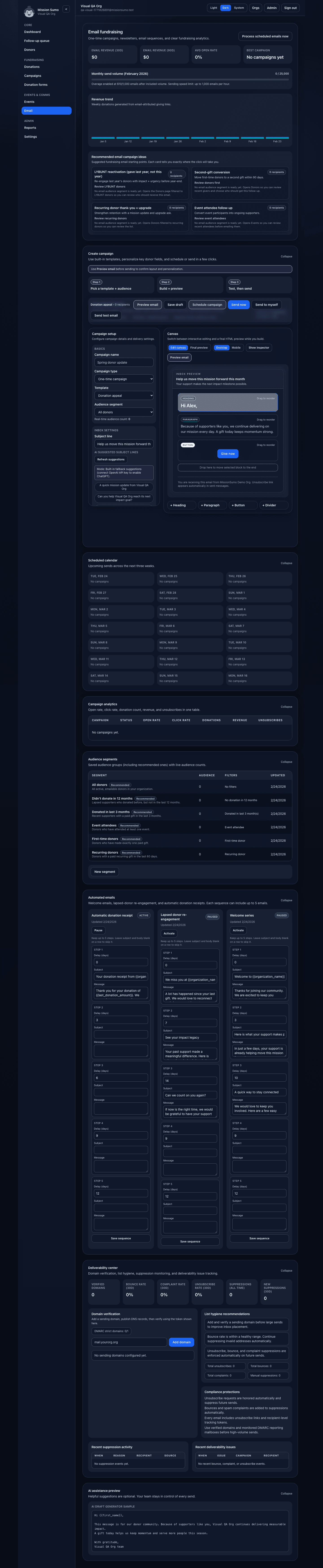
The builder, analytics, audience guidance, and send controls live in one place.
- Draft one campaign in the visual builder.
- Use donor segments or custom tags for the audience.
- Preview the send and test deliverability guidance before going live.
Email is tied to donor data and fundraising outcomes, not a separate marketing silo
Mission Sumo keeps email close to your donor records, tags, giving history, and campaign context so communications stay grounded in fundraising work.
What the workflow feels like for a one-person or small team
Mission Sumo is meant to help teams get a fundraising email out the door without needing marketing-ops expertise.
Start from appeals, thank-you emails, event invites, or impact updates instead of a blank page.
Use the visual builder, then preview the final send before you schedule or send a test.
Select donor segments, custom tags, recurring donors, or lapsed-donor groups from the same CRM used elsewhere.
Track opens, clicks, unsubscribes, and revenue generated by the campaign.

The email workflow is intentionally clear enough for a development director or small communications team member to use without training.

Mission Sumo keeps campaign analytics close to donor segments, gifts, and next-step fundraising work.
What is included today
These are current email-fundraising workflows in Mission Sumo.
- Visual builder with preview mode and email-friendly templates.
- One-time campaigns, newsletters, and short email sequences.
- Test sends, scheduled sending, and campaign analytics.
- AI-assisted subject lines and draft suggestions for fundraising teams.
- Prebuilt and custom donor audiences, including custom tags.
- Welcome, lapsed-donor, and receipt automations.
- Deliverability center with domain checks, suppressions, bounces, and complaints.
- Plan-based quotas, throttling, and admin override controls.
Audience targeting is built from real fundraising segments
Mission Sumo uses the same donor data your team already maintains, so email audiences stay relevant and easy to reuse.
| Audience source | Typical use | Included in Mission Sumo |
|---|---|---|
| LYBUNT / SYBUNT | Re-engagement and retention appeals | Yes |
| Recurring donors | Stewardship and monthly donor updates | Yes |
| Event attendees | Invites and post-event follow-up | Yes |
| Custom tags | Programs, prospects, board networks, and internal segments | Yes |
| Custom saved segments | Reusable campaign audiences for future sends | Yes |